// Showcase sections for the GraphytiEngine + asset generator release: the hero reel, the six highlights, articulated
// assets coming apart, the parametric garage, the scene planner, native rendering, mechs, humans, ThreeRT vs Cycles,
// toon styles. Media lives in media/ (scripts/collect-media.py gathers it from the engine and generator outputs).

// ---------- shared pieces ----------

/** True once the element has scrolled into view (and, with `live`, false again when it leaves). */
const useInView = (ref, { live = false, margin = '0px 0px -10% 0px' } = {}) => {
  const [seen, setSeen] = React.useState(false);
  React.useEffect(() => {
    const el = ref.current;
    if (!el) return;
    const io = new IntersectionObserver(([e]) => {
      if (e.isIntersecting) setSeen(true);
      else if (live) setSeen(false);
    }, { rootMargin: margin, threshold: 0.15 });
    io.observe(el);
    return () => io.disconnect();
  }, [ref, live, margin]);
  return seen;
};

/** Children fade and rise into place when scrolled to (staggered by `delay` ms). */
const Reveal = ({ children, delay = 0, style, className = '' }) => {
  const ref = React.useRef(null);
  const seen = useInView(ref);
  return (
    <div ref={ref} className={`reveal ${seen ? 'in' : ''} ${className}`} style={{ transitionDelay: `${delay}ms`, ...style }}>
      {children}
    </div>
  );
};

/** A muted looping clip that only plays while on screen (and only loads when near it). */
const LiveVideo = ({ src, poster, label, style, className, onEnded, loop = true, playing = true }) => {
  const ref = React.useRef(null);
  const visible = useInView(ref, { live: true, margin: '200px 0px 200px 0px' });
  React.useEffect(() => {
    const v = ref.current;
    if (!v) return;
    if (visible && playing) v.play().catch(() => {});
    else v.pause();
  }, [visible, playing, src]);
  return (
    <video ref={ref} className={className} src={visible ? src : undefined} poster={poster} muted loop={loop} playsInline
      role="img" aria-label={label} title={label}
      preload="none" onEnded={onEnded} style={{ width: '100%', height: '100%', objectFit: 'cover', display: 'block', background: '#000', ...style }} />
  );
};

/** Drag (or hover) to compare two frames of the same view. */
const CompareSlider = ({ left, right, leftLabel, rightLabel, aspect = '16/9' }) => {
  const [x, setX] = React.useState(50);
  const box = React.useRef(null);
  const drag = React.useRef(false);
  const move = (clientX) => {
    const r = box.current.getBoundingClientRect();
    setX(Math.max(0, Math.min(100, ((clientX - r.left) / r.width) * 100)));
  };
  return (
    <div ref={box} className="compare" style={{ aspectRatio: aspect }}
      onPointerDown={(e) => { drag.current = true; move(e.clientX); e.currentTarget.setPointerCapture(e.pointerId); }}
      onPointerMove={(e) => { if (drag.current || e.pointerType === 'mouse') move(e.clientX); }}
      onPointerUp={() => { drag.current = false; }}>
      <img src={right} alt={`The same frame, ${rightLabel.toLowerCase()}`} draggable={false} />
      <img src={left} alt={`The same frame, ${leftLabel.toLowerCase()}`} draggable={false} style={{ clipPath: `inset(0 ${100 - x}% 0 0)` }} />
      <div className="compare-bar" style={{ left: `${x}%` }}><span>⟷</span></div>
      <span className="compare-tag mono" style={{ left: 12 }}>{leftLabel}</span>
      <span className="compare-tag mono" style={{ right: 12 }}>{rightLabel}</span>
    </div>
  );
};

const SecHead = ({ num, kicker, title, children }) => (
  <Reveal className="sec-head">
    <div className="meta">
      <span className="num">{num}</span>
      <span className="line" />
      <span>{kicker}</span>
    </div>
    <h2>{title}</h2>
    {children && <p>{children}</p>}
  </Reveal>
);

const Chip = ({ children }) => <span className="chip mono">{children}</span>;

// ---------- hero: full-bleed path-traced reel ----------
const REEL = [
  { src: 'media/reel/mechs-avenue.mp4', poster: 'media/reel/mechs-avenue.jpg', label: 'GOLDEN_AVENUE · MECHS · THREERT LIVE' },
  { src: 'media/reel/neon-megacity.mp4', poster: 'media/reel/neon-megacity.jpg', label: 'NEON_MEGACITY_3X3 · THREERT LIVE' },
  { src: 'media/reel/hearth-room.mp4', poster: 'media/reel/hearth-room.jpg', label: 'HEARTH_ROOM · FIRE · THREERT LIVE' },
];

const HeroReel = ({ onWaitlist }) => {
  const [i, setI] = React.useState(0);
  React.useEffect(() => {
    const t = setInterval(() => setI((k) => (k + 1) % REEL.length), 7000);
    return () => clearInterval(t);
  }, []);
  return (
    <section className="hero-reel">
      {REEL.map((c, k) => (
        <video key={c.src} className={`hero-clip ${k === i ? 'on' : ''}`} src={c.src} poster={c.poster} autoPlay muted loop playsInline role="img" aria-label={`Graphyti scene rendered live: ${c.label.toLowerCase()}`} preload={k === 0 ? 'auto' : 'metadata'} />
      ))}
      <div className="hero-shade" />
      <div className="scanlines" />
      <div className="wrap hero-copy">
        <HudTag>GRAPHYTI ENGINE · THREERT · ASSET GENERATOR</HudTag>
        <h1 className="hero-h1-long">
          Graphyti turns text into 3D worlds you can <span className="glow">play, simulate and film.</span>
        </h1>
        <p className="hero-tagline">Prompt a world. Path-trace it live.</p>
        <p>
          An agent-native 3D engine with its own asset generator: cities, interiors and forests planned from a prompt,
          articulated vehicles and mechs built from parameters, and every frame ray traced in real time by ThreeRT —
          on the desktop and in the browser.
        </p>
        <div style={{ display: 'flex', gap: 14, flexWrap: 'wrap' }}>
          <button className="btn btn-primary" onClick={onWaitlist}>Join the waitlist <span className="arrow">→</span></button>
          <a className="btn btn-ghost" href="#assembly">See it build</a>
        </div>
        <div className="hero-stats">
          <HudReadout label="Cities, native" value="60 FPS" />
          <HudReadout label="Preview render" value="~7 S" />
          <HudReadout label="Joints per asset" value="UP TO 45" />
          <HudReadout label="Code required" value="NONE" />
        </div>
      </div>
      <div className="hero-label mono">
        <span style={{ color: 'var(--accent)' }}>● LIVE</span> {REEL[i].label}
        <span className="hero-dots">
          {REEL.map((_, k) => <button key={k} aria-label={`Clip ${k + 1}`} className={k === i ? 'on' : ''} onClick={() => setI(k)} />)}
        </span>
      </div>
    </section>
  );
};

// ---------- outcomes, by audience ----------
const OUTCOMES = [
  { k: 'GAMES', line: 'Describe a game. Play it in your browser.', img: 'media/scifi/black-hole.jpg' },
  { k: 'SYNTHETIC DATA', line: 'Any environment your robot will ever see, generated on demand.', img: 'media/showcase/city-italian-alley.jpg' },
  { k: 'FILM', line: 'Sets in seconds, not months.', img: 'media/compare/hearth-threert.jpg' },
];

const Outcomes = () => (
  <section className="outcomes-band">
    <div className="wrap outcomes">
      {OUTCOMES.map((o, k) => (
        <Reveal key={o.k} delay={k * 80}>
          <div className="outcome">
            <div className="outcome-img" role="img" aria-label={`${o.k.toLowerCase()}: a Graphyti scene`} style={{ backgroundImage: `url(${o.img})` }} />
            <span className="mono outcome-k">{o.k}</span>
            <p>{o.line}</p>
          </div>
        </Reveal>
      ))}
    </div>
  </section>
);

// ---------- the six highlights ----------
const HIGHLIGHTS = [
  { n: '01', title: 'Advanced scene planner', body: 'Interiors, cities and forests laid out from a prompt: rooms that make sense, streets that connect, terrain, rivers and lakes that sit in their basins.', href: '#planner', img: 'media/showcase/city-italian-alley.jpg' },
  { n: '02', title: 'Parametric articulated assets', body: 'Cars, buses, trucks, aircraft, trains, boats and mechs generated from parameters — with real hinges, wheels and rotors that move.', href: '#assembly', img: 'media/garage/hypercar-4.jpg' },
  { n: '03', title: 'Native water, fire, fog & sci-fi', body: 'Lakes and rivers as data, simulated fire, volumetric haze, rain and wet streets, black holes, portals, shields and holograms, and every lamp a real light.', href: '#scifi', img: 'media/scifi/black-hole-threert.jpg' },
  { n: '04', title: 'Human reconstruction', body: 'Photoreal people: faces, skin, hair and clothing generated or rebuilt from a single photo, rigged for the engine.', href: null, img: 'media/humans/hero-f.jpg' },
  { n: '05', title: 'Browser & ThreeRT desktop', body: 'The same scene code runs path traced in a native ThreeRT app and in a browser tab over WebGPU, with a three.js fallback everywhere else.', href: '#platforms', img: 'media/compare/hearth-threert.jpg' },
  { n: '06', title: 'Toon shading styles', body: 'Switch a whole world between photoreal, anime and painted looks — cel shade, painted skies, ink lines — without touching the scene.', href: '#toon', img: 'media/showcase/toon-cottage-meadow.jpg' },
];

const Highlights = () => (
  <section id="highlights" className="section">
    <div className="wrap">
      <SecHead num="01 / ENGINE" kicker="WHAT SHIPS" title="One engine. Six things nobody else does together.">
        Every image and clip on this page was generated, assembled and rendered by GraphytiEngine and its asset
        generator — no hand modelling, no stock footage.
      </SecHead>
      <div className="hl-grid">
        {HIGHLIGHTS.map((h, k) => (
          <Reveal key={h.n} delay={k * 70}>
            <a className="hl-card" href={h.href || undefined}>
              <div className="hl-img" role="img" aria-label={`${h.title}: example render`} style={{ backgroundImage: `url(${h.img})` }} />
              <div className="hl-body">
                <span className="mono hl-n">{h.n}</span>
                <h3>{h.title}</h3>
                <p>{h.body}</p>
                <span className="mono hl-go">{h.href ? 'EXPLORE →' : 'COMING SOON'}</span>
              </div>
            </a>
          </Reveal>
        ))}
      </div>
    </div>
  </section>
);

// ---------- articulated assets coming apart ----------
const ASSEMBLIES = [
  { key: 'a320', name: 'Airbus A320-class airliner', kind: 'AIRCRAFT', parts: 22, joints: 21, note: 'flaps, ailerons, slats, gear and doors on their hinges' },
  { key: 'h145', name: 'H145-class helicopter', kind: 'AIRCRAFT', parts: 12, joints: 11, note: 'rotor, tail fan, doors and skids' },
  { key: 'f35', name: 'Stealth fighter', kind: 'AIRCRAFT', parts: 11, joints: 10, note: 'canopy, control surfaces, bays' },
  { key: 'n700s', name: 'N700S-class bullet train', kind: 'RAIL', parts: 24, joints: 21, note: 'bogies, wheelsets, pantograph, doors' },
  { key: 'c57', name: 'C57 steam locomotive', kind: 'RAIL', parts: 15, joints: 12, note: 'driving wheels, rods, tender' },
  { key: 'double-decker', name: 'Double-decker bus', kind: 'COMMERCIAL', parts: 9, joints: 8, note: 'wheels and doors' },
  { key: 'box-truck', name: 'Box truck', kind: 'COMMERCIAL', parts: 9, joints: 8, note: 'cab doors, roller shutter, wheels' },
  { key: 'hypercar', name: 'Hypercar', kind: 'CAR', parts: 10, joints: 9, note: 'scissor doors, bonnet, boot, wheels' },
  { key: 'suv', name: 'SUV', kind: 'CAR', parts: 11, joints: 10, note: 'four doors, bonnet, tailgate, wheels' },
];

const Assembly = () => {
  const [i, setI] = React.useState(0);
  const a = ASSEMBLIES[i];
  return (
    <section id="assembly" className="section">
      <div className="wrap">
        <SecHead num="02 / ASSETS" kicker="ARTICULATED BY CONSTRUCTION" title="Every part is real. Watch them come apart.">
          The generator builds assets as parts on joints, not frozen meshes. Doors swing on their hinges, wheels and
          rotors spin, then every part lifts off its parent and drops back into place — path traced live in ThreeRT.
        </SecHead>
        <Reveal>
          <div className="stage">
            <HudCorners color="var(--accent)" />
            <LiveVideo key={a.key} src={`media/assembly/${a.key}.mp4`} poster={`media/assembly/${a.key}.jpg`} label={`${a.name} coming apart into its parts and reassembling, path traced in ThreeRT`} />
            <div className="stage-info">
              <span className="mono stage-kind">{a.kind}</span>
              <h3>{a.name}</h3>
              <div style={{ display: 'flex', gap: 8, flexWrap: 'wrap' }}>
                <Chip>{a.parts} PARTS</Chip><Chip>{a.joints} JOINTS</Chip><Chip>{a.note}</Chip>
              </div>
            </div>
          </div>
        </Reveal>
        <div className="rail">
          {ASSEMBLIES.map((x, k) => (
            <button key={x.key} className={`rail-item ${k === i ? 'on' : ''}`} onClick={() => setI(k)}>
              <img src={`media/assembly/${x.key}.jpg`} alt={x.name} loading="lazy" />
              <span className="mono">{x.name}</span>
            </button>
          ))}
        </div>
      </div>
    </section>
  );
};

// ---------- the parametric garage ----------
const GARAGE = [
  { f: 'sports-3', name: 'Sports coupé', seed: 3 }, { f: 'hypercar-3', name: 'Hypercar', seed: 3 },
  { f: 'luxury-saloon-3', name: 'Luxury saloon', seed: 3 }, { f: 'hypercar-4', name: 'Hypercar', seed: 4 },
  { f: 'suv-3', name: 'SUV', seed: 3 }, { f: 'sports-4', name: 'Sports coupé', seed: 4 },
  { f: 'hatch-4', name: 'Hatchback', seed: 4 }, { f: 'saloon-4', name: 'Saloon', seed: 4 },
  { f: 'boat-go-fast', name: 'Go-fast boat' }, { f: 'boat-bowrider', name: 'Bowrider' },
  { f: 'boat-center-console', name: 'Center console' }, { f: 'boat-flybridge', name: 'Flybridge cruiser' },
];

const Garage = () => (
  <section id="garage" className="section">
    <div className="wrap">
      <SecHead num="03 / GENERATORS" kicker="PARAMETRIC DESIGN" title="A new car is a seed and a few numbers.">
        Class, wheelbase, roofline, lamps, grille, wheels and paint are parameters with logical limits, so every variant
        still makes sense. Each turntable below is a different generated design, rendered at half a second a frame.
      </SecHead>
      <div className="garage">
        {GARAGE.map((g, k) => (
          <Reveal key={g.f} delay={(k % 4) * 60}>
            <div className="garage-cell">
              <LiveVideo src={`media/garage/${g.f}.mp4`} poster={`media/garage/${g.f}.jpg`} label={`Turntable of a generated ${g.name.toLowerCase()}, design seed ${g.seed}`} />
              <div className="garage-tag mono">
                <span>{g.name}</span>
                {g.seed !== undefined && <span style={{ color: 'var(--accent)' }}>SEED {g.seed}</span>}
              </div>
            </div>
          </Reveal>
        ))}
      </div>
    </div>
  </section>
);

// ---------- mechs in the world ----------
const Mechs = () => (
  <section id="mechs" className="section">
    <div className="wrap">
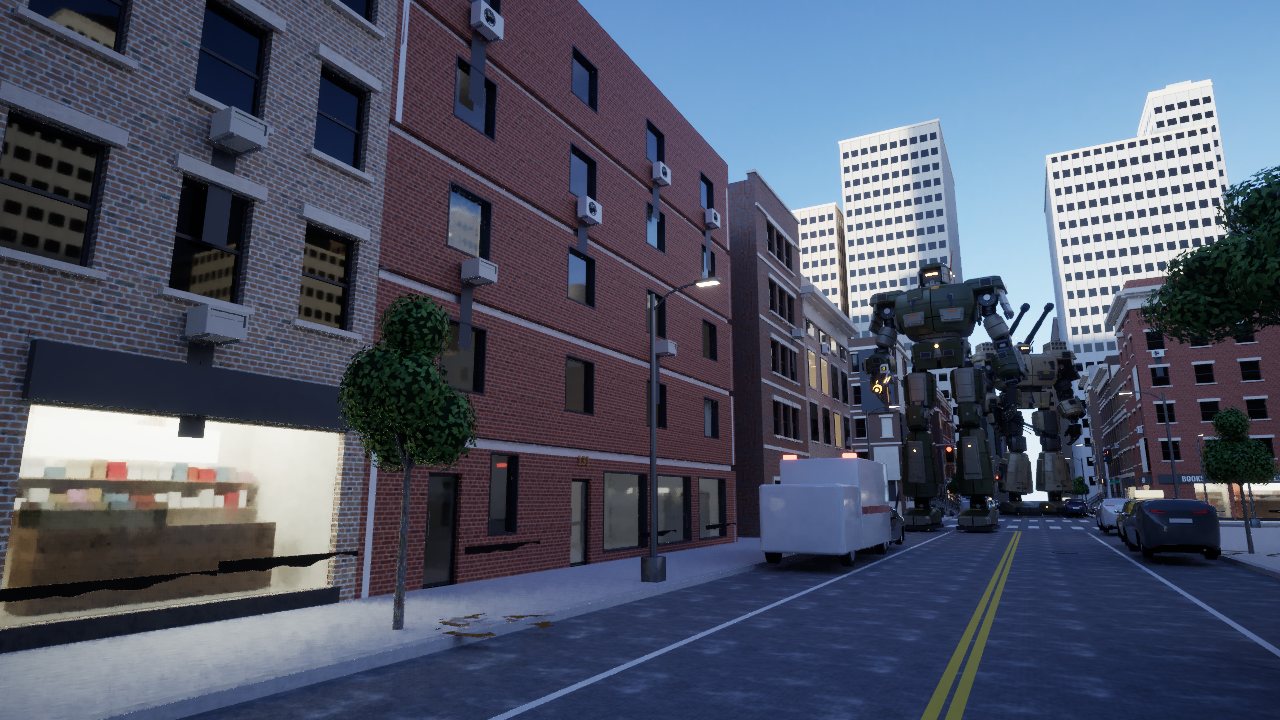
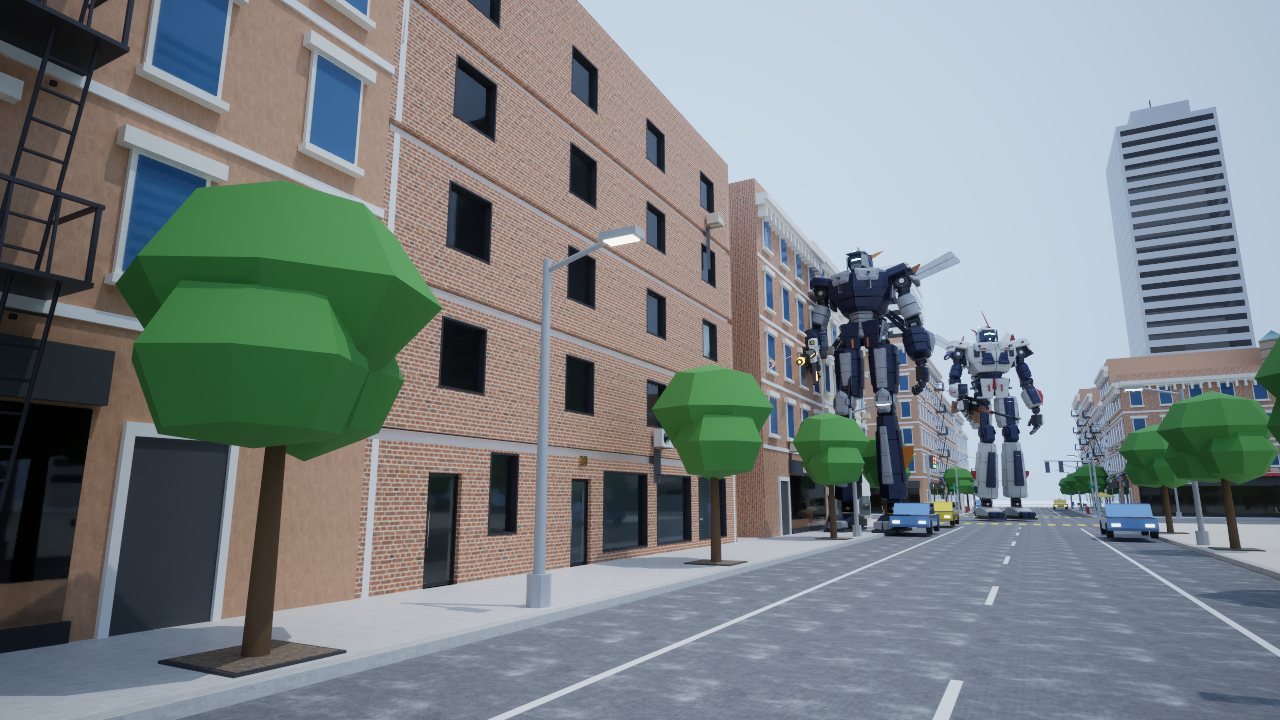
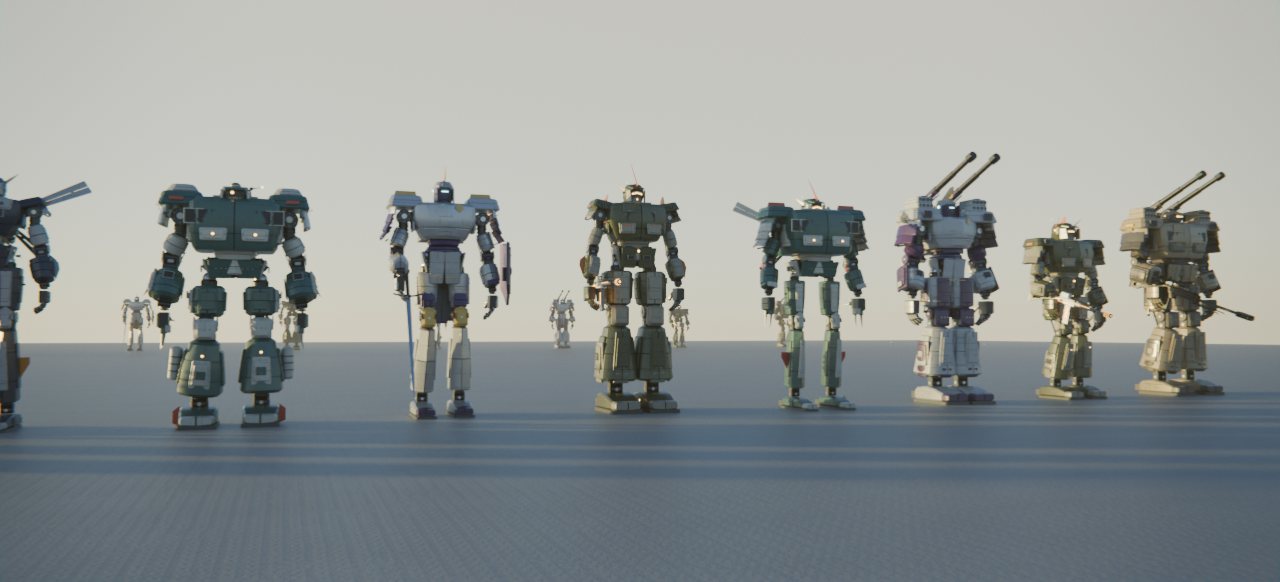
      <SecHead num="04 / KITS" kicker="MECHA KITS" title="Sixteen-metre mechs, dropped into any world.">
        Mecha suits from the kit system — warden, bastion, kestrel, zephyr — staged in generated cities and lit by
        the city's own sky.
      </SecHead>
      <div className="mech-grid">
        <Reveal><figure className="tile tall"><img src="media/mechs/mechs-golden-avenue.jpg" alt="Mechs on a generated avenue" loading="lazy" /><figcaption className="mono">GOLDEN_AVENUE · WARDEN + BASTION</figcaption></figure></Reveal>
        <Reveal delay={80}><figure className="tile"><img src="media/mechs/mechs-nyc.jpg" alt="Mechs in a generated downtown" loading="lazy" /><figcaption className="mono">NYC_3X3 · ZEPHYR + KESTREL</figcaption></figure></Reveal>
        <Reveal delay={160}><figure className="tile"><img src="media/worlds/mecha-lineup.jpg" alt="The mecha kit lineup" loading="lazy" /><figcaption className="mono">THE KIT · 13 SUITS</figcaption></figure></Reveal>
      </div>
    </div>
  </section>
);

// ---------- the scene planner ----------
const PLANS = [
  { plan: 'media/plans/restaurant-plan.jpg', world: 'media/worlds/restaurant.jpg', name: 'Interior', note: 'tables, booths, bar and piano placed by layout rules, with walkways kept clear', blueprint: true },
  { plan: 'media/plans/city-aerial.jpg', world: 'media/worlds/city-street.jpg', name: 'City', note: 'districts, blocks, streets, signage, trees and traffic from one city spec' },
  { plan: 'media/plans/fern-hollow-plan.jpg', world: 'media/worlds/fern-hollow.jpg', name: 'Forest', note: 'canopy, understory and ferns scattered by biome recipes', blueprint: true },
];

const Planner = () => (
  <section id="planner" className="section">
    <div className="wrap">
      <SecHead num="05 / PLANNER" kicker="SCENE PLANNER" title="From a plan to a world — interiors, cities and forests.">
        The planner turns a prompt into a layout first: rooms and what belongs in them, city blocks and their streets,
        terrain, water and paths. Hover a plan to see the world it became.
      </SecHead>
      <div className="plans">
        {PLANS.map((p, k) => (
          <Reveal key={p.name} delay={k * 90}>
            <div className="plan-card">
              <div className="plan-img"><img src={p.world} alt={`${p.name} world`} loading="lazy" /><img className={`plan-top ${p.blueprint ? 'blueprint' : ''}`} src={p.plan} alt={`${p.name} plan`} loading="lazy" /></div>
              <div className="plan-body"><span className="mono" style={{ color: 'var(--accent)', fontSize: 11, letterSpacing: '0.2em' }}>PLAN → WORLD</span><h3>{p.name}</h3><p>{p.note}</p></div>
            </div>
          </Reveal>
        ))}
      </div>
      <div className="gallery">
        {[['media/showcase/downtown-rain.jpg', 'DOWNTOWN · RAIN'], ['media/showcase/city-italian-alley.jpg', 'ALLEY · RAIN'],
          ['media/showcase/interior-future-loft.jpg', 'FUTURE LOFT'], ['media/showcase/terrain-alpine-range.jpg', 'ALPINE RANGE'],
          ['media/showcase/forest-fern-overlook.jpg', 'FOREST OVERLOOK'], ['media/worlds/neon-megacity.jpg', 'NEON MEGACITY'],
          ['media/worlds/restaurant.jpg', 'RESTAURANT'], ['media/worlds/velvet-hour.jpg', 'COCKTAIL BAR']].map(([src, tag], k) => (
          <Reveal key={src} delay={(k % 4) * 60}>
            <figure className="tile"><img src={src} alt={tag} loading="lazy" /><figcaption className="mono">{tag}</figcaption></figure>
          </Reveal>
        ))}
      </div>
    </div>
  </section>
);

// ---------- native rendering ----------
const NATIVE = [
  { img: 'media/showcase/forest-lake-shore.jpg', tag: 'WATER', title: 'Lakes and rivers as data', body: 'Depth, flow and shoreline grids drive the shading: clear shallows, mirror-calm reflections, currents and falls.' },
  { img: 'media/worlds/firelit-armoury.jpg', tag: 'FIRE', title: 'Simulated fire', body: 'Fires are volume simulations that light the room, not sprites — hearths, braziers, candles.' },
  { img: 'media/worlds/hangar-bay.jpg', tag: 'FOG', title: 'Volumetric haze', body: 'Light shafts and glow in the air, lit by every lamp in the scene.' },
  { img: 'media/scifi/shield.jpg', tag: 'SCI-FI', title: 'Impossible physics', body: 'Black holes that bend light, holograms, shields and portals — as engine features, not post effects. See below.' },
  { img: 'media/worlds/velvet-hour.jpg', tag: 'LIGHTING', title: 'Every fixture is a light', body: 'Neon, pendants, practicals and screens emit real light, with auto-contrast tuned per scene.' },
  { img: 'media/worlds/line9-platform.jpg', tag: 'WEATHER', title: 'Rain and wet streets', body: 'Falling rain, puddles in the hollows and wet asphalt that mirrors the lights.' },
];

const NativeRendering = () => (
  <section id="rendering" className="section">
    <div className="wrap">
      <SecHead num="06 / RENDERING" kicker="NATIVE, NOT FAKED" title="Water, fire, fog, sci-fi physics and light fixtures — built in.">
        The engine owns its effects. They are described once as data and rendered the same way in Cycles for reference,
        in ThreeRT in real time, and in the browser.
      </SecHead>
      <div className="bento">
        {NATIVE.map((n, k) => (
          <Reveal key={n.tag} delay={(k % 3) * 80} className={k === 0 ? 'wide' : ''}>
            <figure className="tile bento-tile">
              <img src={n.img} alt={n.title} loading="lazy" />
              <figcaption><span className="mono">{n.tag}</span><h3>{n.title}</h3><p>{n.body}</p></figcaption>
            </figure>
          </Reveal>
        ))}
      </div>
    </div>
  </section>
);

// ---------- sci-fi: impossible physics and sci-fi assets ----------
const PHYSICS = [
  { f: 'black-hole', tag: 'BLACK HOLE', note: 'gravitational lensing, accretion disc, infalling particles' },
  { f: 'portal', tag: 'PORTALS', note: 'linked doorways; bodies keep their momentum through them' },
  { f: 'shield', tag: 'SHIELDS', note: 'a force field that ripples where it is hit' },
  { f: 'hologram', tag: 'HOLOGRAMS', note: 'projected light, scanlines and flicker' },
  { f: 'vortex', tag: 'VORTEX', note: 'a field that drags particles and light into a funnel' },
  { f: 'rules-lab', tag: 'GRAVITY & TIME', note: 'a planetoid with its own gravity, bullet time, force fields' },
];
const SCIFI_ASSETS = [
  ['leviathan', 'LEVIATHAN · BIO-MECHANICAL SHIP'], ['skyship', 'SKYSHIP'], ['station', 'ORBITAL STATION'],
  ['rover', 'PLANETARY ROVER'], ['hover-trucks', 'HOVER TRUCKS'], ['mech-kestrel', 'MECH · KESTREL'],
  ['mech-warden-commander', 'MECH · WARDEN COMMANDER'], ['mech-bastion-siege', 'MECH · BASTION SIEGE'],
];

const SciFi = () => (
  <section id="scifi" className="section">
    <div className="wrap">
      <SecHead num="07 / SCI-FI" kicker="IMPOSSIBLE PHYSICS" title="Black holes, portals and shields — as physics, not post effects.">
        Impossible physics is part of the engine: authored as data, simulated, and drawn by the same renderer as
        everything else. Above, a Schwarzschild black hole path traced live in ThreeRT, its disc bent over and under
        the shadow by gravity. Below, the same effects running in a browser tab.
      </SecHead>
      <Reveal>
        <div className="stage">
          <HudCorners color="var(--accent)" />
          <LiveVideo src="media/scifi/black-hole-threert.mp4" poster="media/scifi/black-hole-threert.jpg" label="A black hole with an accretion disc and gravitational lensing, path traced live in ThreeRT" />
          <div className="stage-info">
            <span className="mono stage-kind">THREERT · PATH TRACED LIVE</span>
            <h3>Event horizon</h3>
            <div style={{ display: 'flex', gap: 8, flexWrap: 'wrap' }}><Chip>GRAVITATIONAL LENSING</Chip><Chip>ACCRETION DISC</Chip><Chip>STARFIELD</Chip></div>
          </div>
        </div>
      </Reveal>
      <div className="physics">
        {PHYSICS.map((x, k) => (
          <Reveal key={x.f} delay={(k % 3) * 70}>
            <div className="garage-cell">
              <LiveVideo src={`media/scifi/${x.f}.mp4`} poster={`media/scifi/${x.f}.jpg`} label={`${x.tag.toLowerCase()}: ${x.note}`} />
              <div className="physics-tag"><span className="mono">{x.tag}</span><span>{x.note}</span></div>
            </div>
          </Reveal>
        ))}
      </div>
      <div className="mono" style={{ fontSize: 11, letterSpacing: '0.2em', color: 'var(--text-dim)', margin: '34px 0 14px' }}>SCI-FI ASSETS · GENERATED</div>
      <div className="gallery">
        {SCIFI_ASSETS.map(([f, tag], k) => (
          <Reveal key={f} delay={(k % 4) * 60}>
            <figure className="tile"><img src={`media/scifi/${f}.jpg`} alt={tag} loading="lazy" style={f.startsWith('mech') ? { objectPosition: '50% 8%' } : undefined} /><figcaption className="mono">{tag}</figcaption></figure>
          </Reveal>
        ))}
      </div>
    </div>
  </section>
);

// ---------- ThreeRT: desktop and browser ----------
const Platforms = () => (
  <section id="platforms" className="section">
    <div className="wrap">
      <SecHead num="08 / THREERT" kicker="REAL-TIME PATH TRACING" title="Film-quality light in seconds — on the desktop and in the browser.">
        ThreeRT path traces the same frame as Cycles, and keeps tracing it live at 60 fps in its desktop app. Drag across to compare.
      </SecHead>
      <div className="plat">
        <Reveal><CompareSlider left="media/compare/hearth-cycles.jpg" right="media/compare/hearth-threert.jpg" leftLabel="CYCLES · 128 SPP" rightLabel="THREERT · 2048 SPP" /></Reveal>
        <div className="plat-stats">
          {[['60 FPS', 'Generated cities in the ThreeRT desktop app, 1–4 M triangles, on a laptop RTX GPU'],
            ['~7 S', 'A path-traced preview of an asset or room, against 3–10 minutes in Cycles'],
            ['72%', 'Of reference cameras matching Cycles within our parity gates, and climbing'],
            ['WEBGPU', 'The same ThreeRT renderer in a browser tab; three.js with baked light everywhere else']].map(([v, t], k) => (
            <Reveal key={v} delay={k * 80}><div className="stat"><span className="mono stat-v">{v}</span><span className="stat-t">{t}</span></div></Reveal>
          ))}
        </div>
      </div>
    </div>
  </section>
);

// ---------- toon styles ----------
const Toon = () => (
  <section id="toon" className="section">
    <div className="wrap">
      <SecHead num="09 / STYLES" kicker="TOON SHADING" title="Same world. A different hand.">
        Style packs restyle a whole world without touching it: crisp cel shade, painted skies, ink lines, anime trees.
      </SecHead>
      <div className="toon">
        <Reveal><CompareSlider left="media/toon/crossing-realistic.jpg" right="media/toon/crossing-anime.jpg" leftLabel="REALISTIC · CYCLES" rightLabel="ANIME · SAME SCENE" /></Reveal>
        <div className="toon-shots">
          {[['media/showcase/toon-painted-street.jpg', 'PAINTED STREET'], ['media/showcase/toon-cottage-meadow.jpg', 'COTTAGE MEADOW'],
            ['media/showcase/toon-city-courier.jpg', 'ANIME CITY · GAME']].map(([src, tag], k) => (
            <Reveal key={src} delay={k * 80}><figure className="tile"><img src={src} alt={tag} loading="lazy" /><figcaption className="mono">{tag}</figcaption></figure></Reveal>
          ))}
        </div>
      </div>
    </div>
  </section>
);

// ---------- humans ----------
const Humans = () => (
  <section id="humans" className="section">
    <div className="wrap">
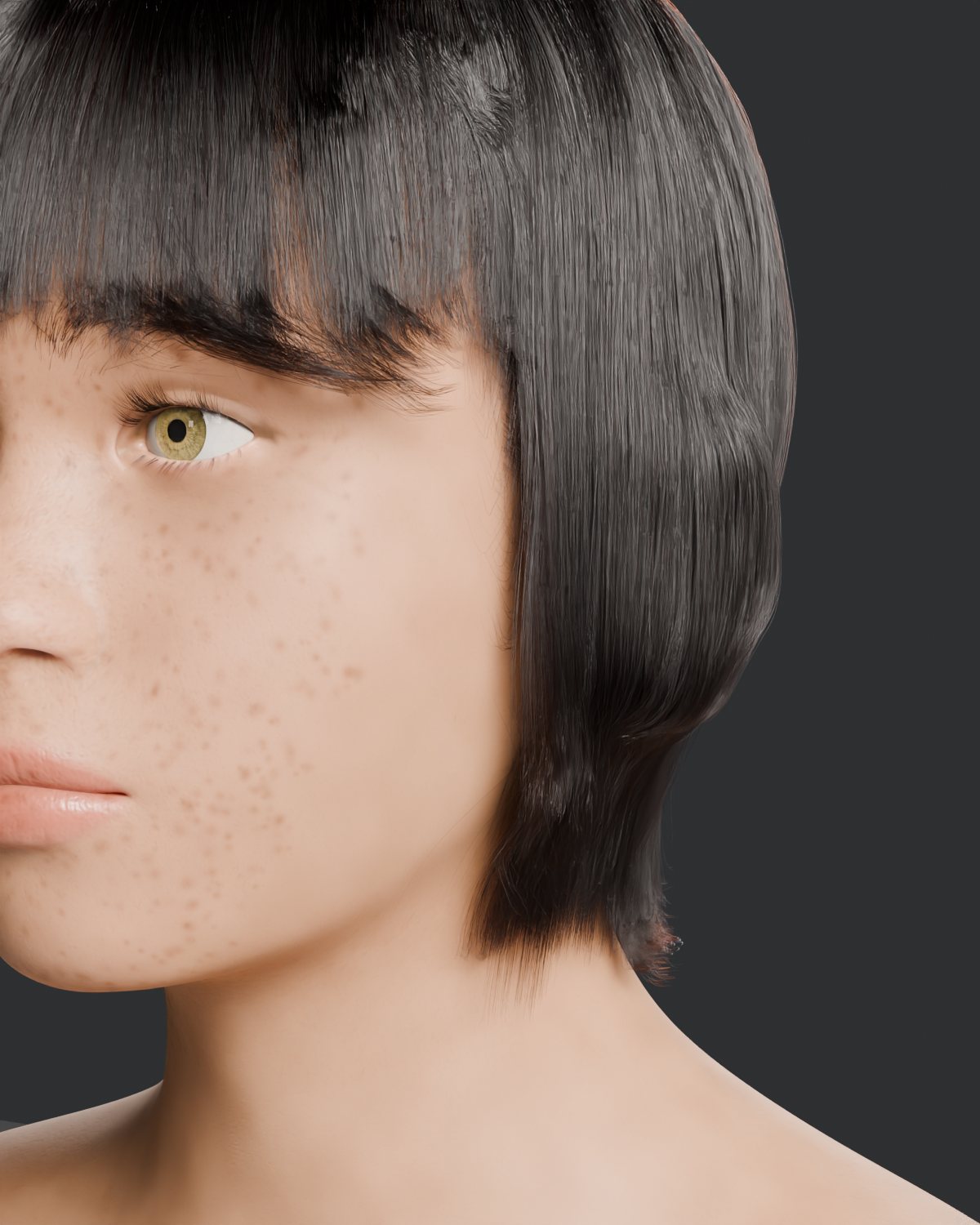
      <SecHead num="10 / PEOPLE" kicker="HUMAN RECONSTRUCTION" title="People with skin, hair and a face of their own.">
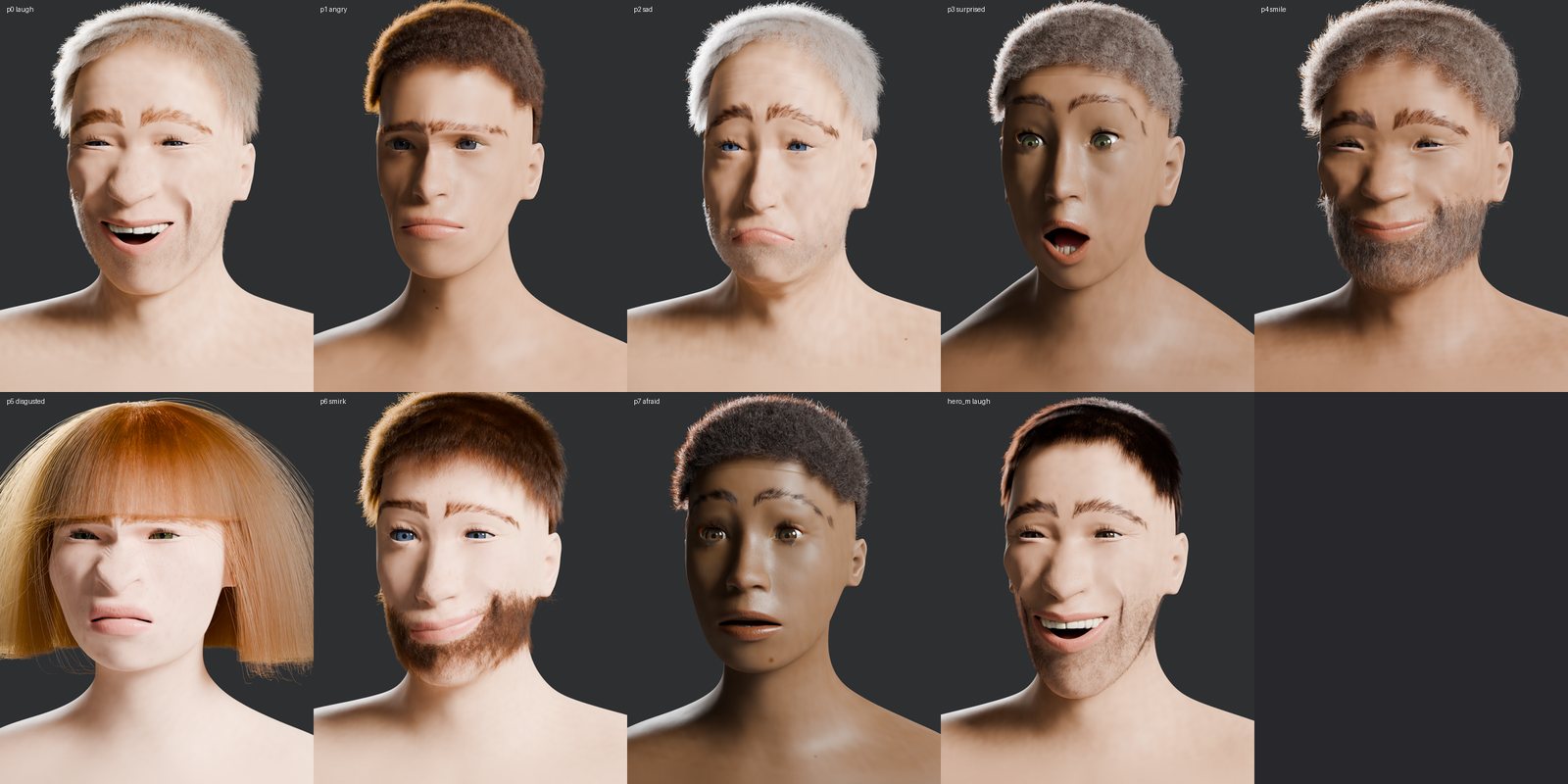
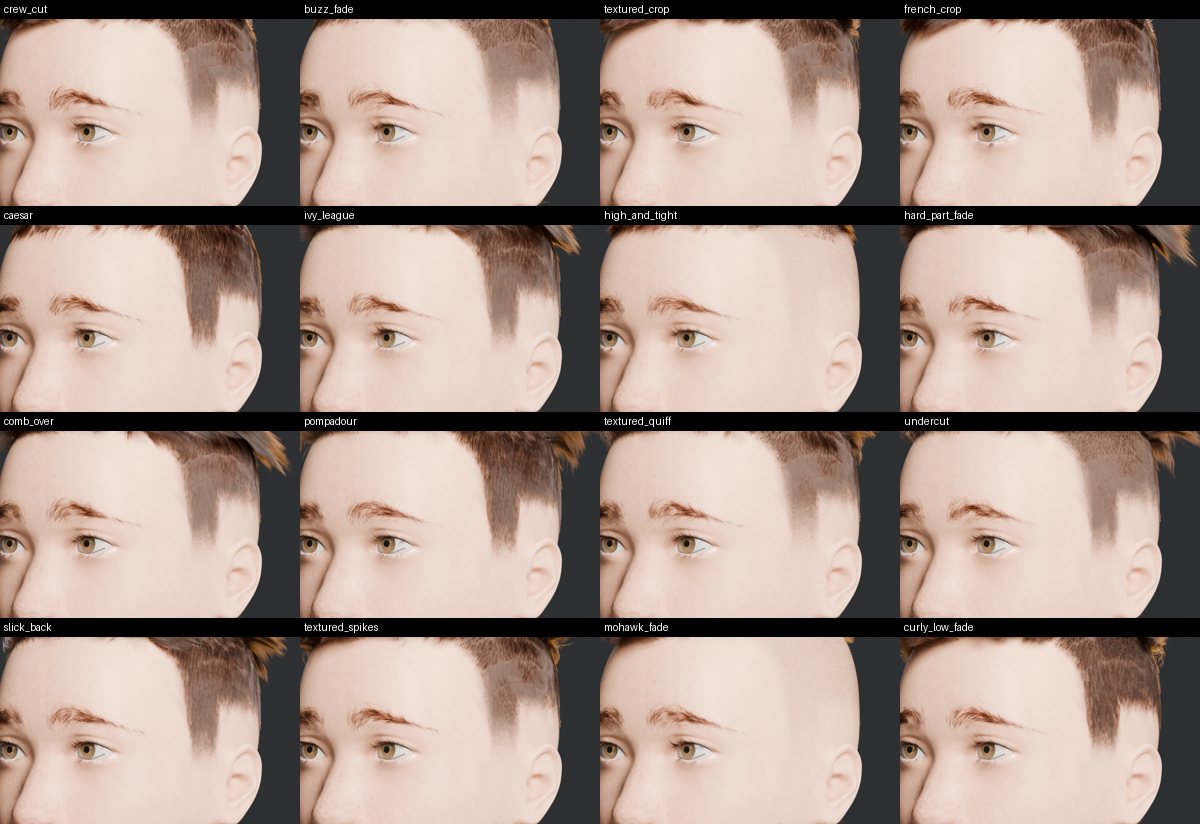
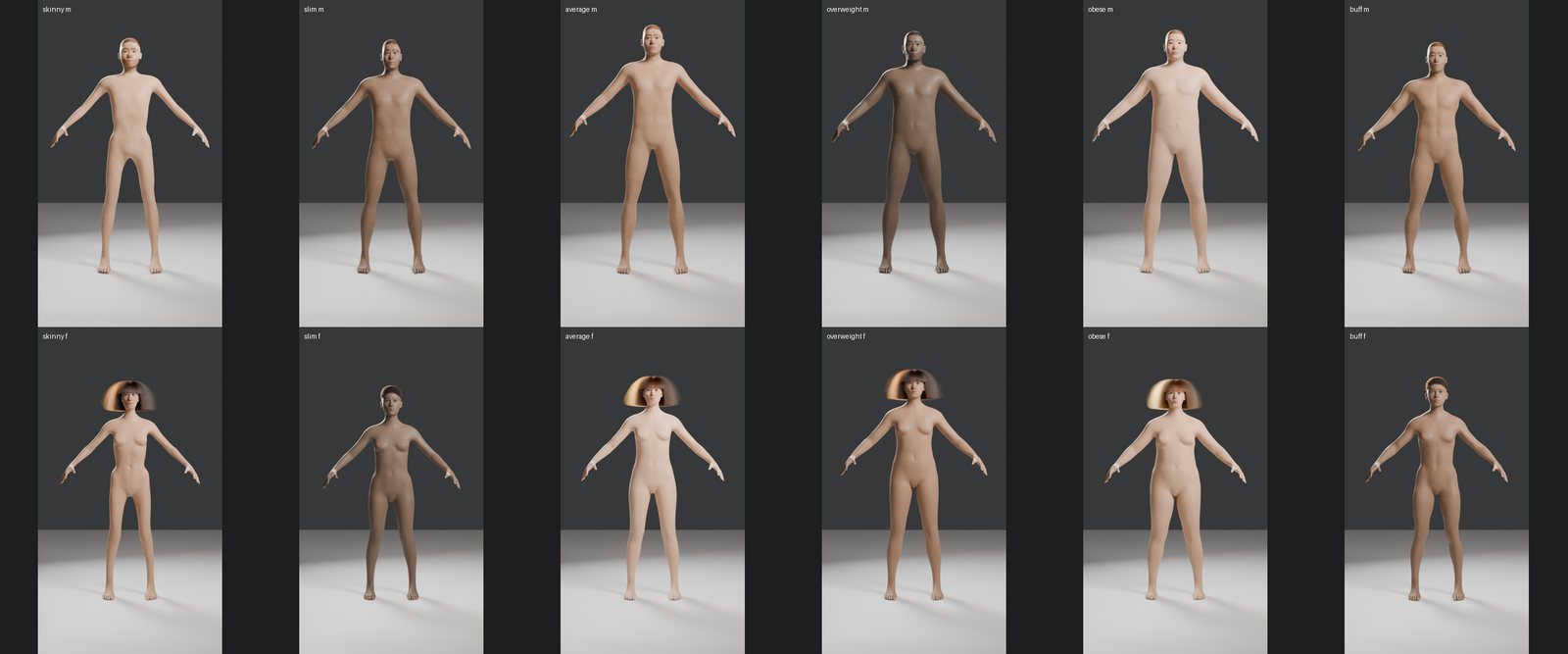
        Faces are measured from a single photo and rebuilt on a generated head, or generated outright: skin with pores
        and wrinkles, groomed hair, clothing, bodies of every build.
      </SecHead>
      <div className="humans">
        <Reveal><figure className="tile tall"><img src="media/humans/hero-f.jpg" alt="A generated face" loading="lazy" /><figcaption className="mono">HERO · THREE-QUARTER</figcaption></figure></Reveal>
        <div className="humans-side">
          <Reveal delay={80}><figure className="tile"><img src="media/humans/faces-lineup.jpg" alt="Face variety" loading="lazy" /><figcaption className="mono">FACES · EXPRESSIONS</figcaption></figure></Reveal>
          <Reveal delay={160}><figure className="tile"><img src="media/humans/haircuts.jpg" alt="Haircuts" loading="lazy" /><figcaption className="mono">HAIRCUTS · 17 STYLES</figcaption></figure></Reveal>
          <Reveal delay={240}><figure className="tile"><img src="media/humans/bodies.jpg" alt="Body builds" loading="lazy" /><figcaption className="mono">BODIES · EVERY BUILD</figcaption></figure></Reveal>
        </div>
      </div>
    </div>
  </section>
);

Object.assign(window, { Outcomes, HeroReel, Highlights, Assembly, Garage, Mechs, Planner, NativeRendering, SciFi, Platforms, Toon, Humans });